
Wholesale (B2B) - Tiered Pricing & Customer Groups for Botble Ecommerce
Wholesale (B2B) - Tiered Pricing & Customer Groups for Botble Ecommerce
If you're running an e-commerce store and want to start selling wholesale — or you already have B2B customers but you're managing pricing through spreadsheets and manual discounts — this one's for you.
We've just released Wholesale (B2B), a plugin that transforms your Botble e-commerce store into a full B2B wholesale platform. Create customer groups, set tiered quantity-based pricing, enforce minimum order quantities, and control which products wholesale buyers can see. All from a single storefront that handles both retail and wholesale customers.

Table of contents [Show]
Why Wholesale?
B2B e-commerce is booming, but most stores aren't set up for it. You end up with separate price lists, manual order processing, and no easy way to manage different buyer tiers. Wholesale solves all of that:
- Increase B2B Revenue: Attract wholesale buyers with competitive tiered pricing that rewards bulk purchases and larger orders
- Manage Customer Tiers: Organize buyers into groups like Bronze, Silver, Gold, and Platinum — each with their own discounts and requirements
- Run Both B2C and B2B: Regular retail customers see standard pricing while approved wholesale customers automatically get their group's discounts. One store, two audiences
- Fully Automated: Pricing, MOQ validation, and product visibility are applied automatically based on customer group membership. Set it up once and let it run
Key Features
Customer Groups
Create unlimited wholesale customer tiers with customizable default discounts and priorities. Each group can have its own discount percentage or fixed amount, priority level, and minimum order requirements.
Design clear progression paths — Bronze to Platinum — to incentivize your wholesale buyers to grow their orders over time.
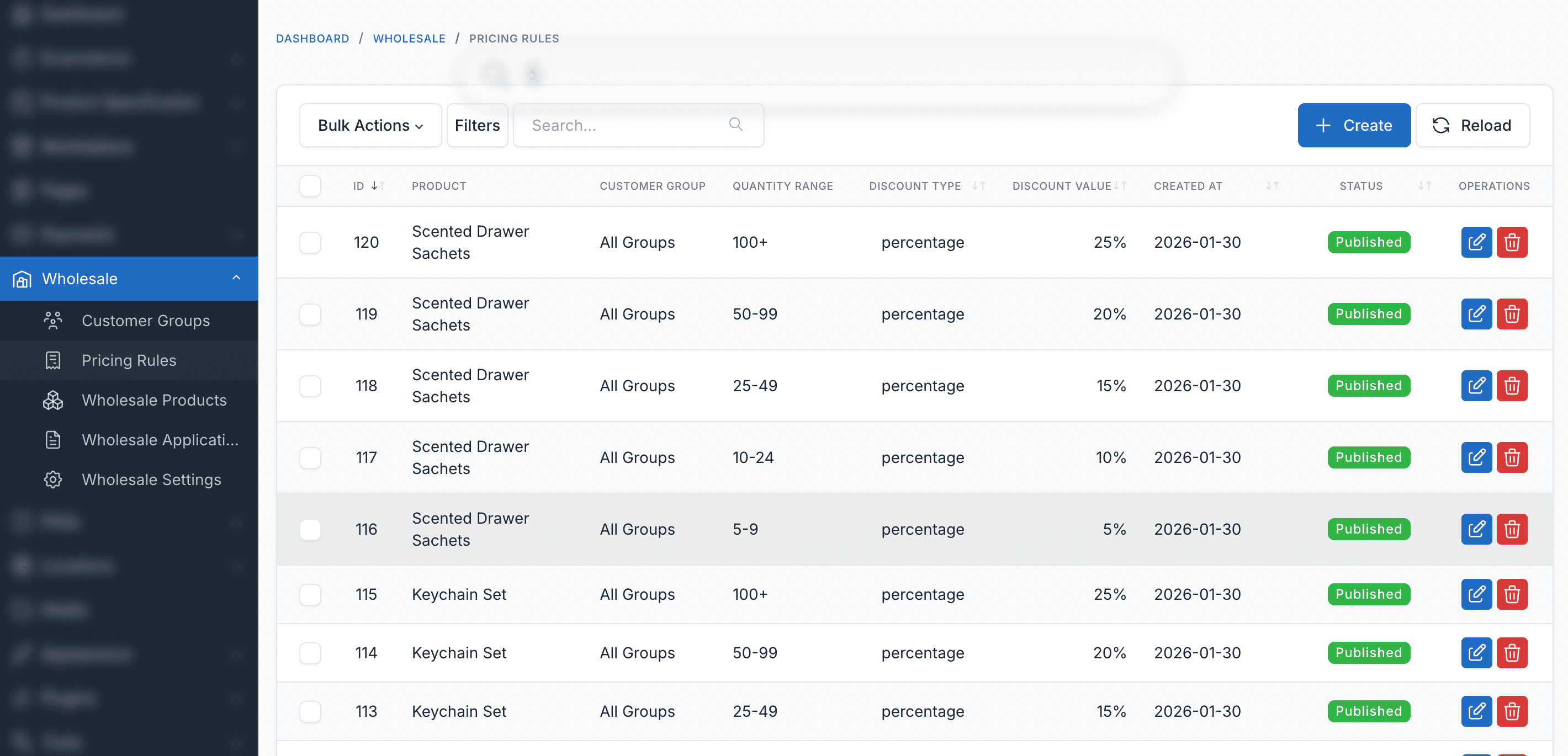
Tiered Pricing Rules
Set quantity-based pricing rules per product with three discount types:
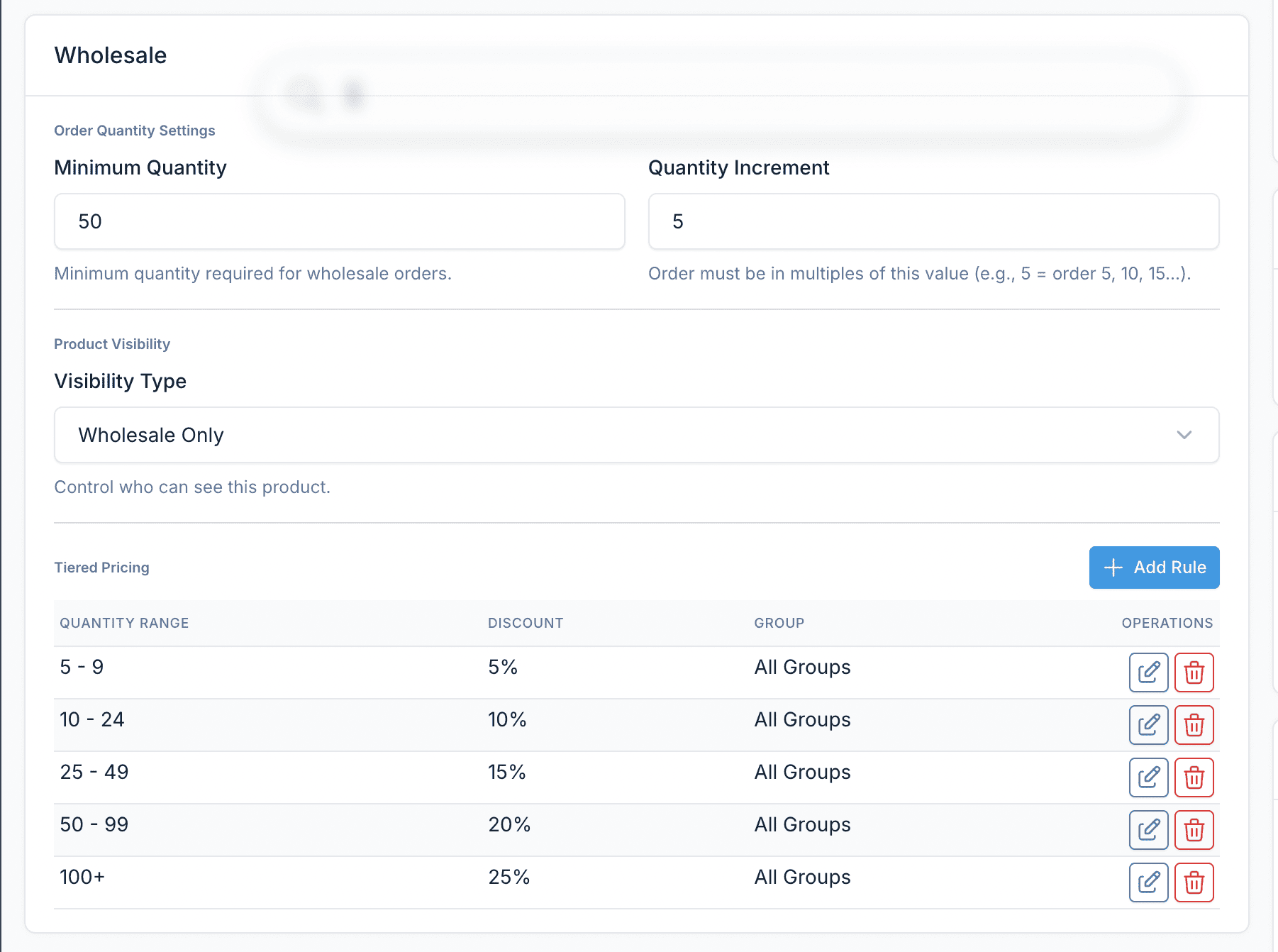
- Percentage off: e.g., 10% off for 10-49 units, 20% off for 50-99, 30% off for 100+
- Fixed amount off: e.g., $5 off per unit for orders of 50+
- Fixed price per unit: e.g., $8.99/unit when ordering 100+
Rules can be global or assigned to specific customer groups, giving you full control over who gets what pricing.
Pricing Table Display
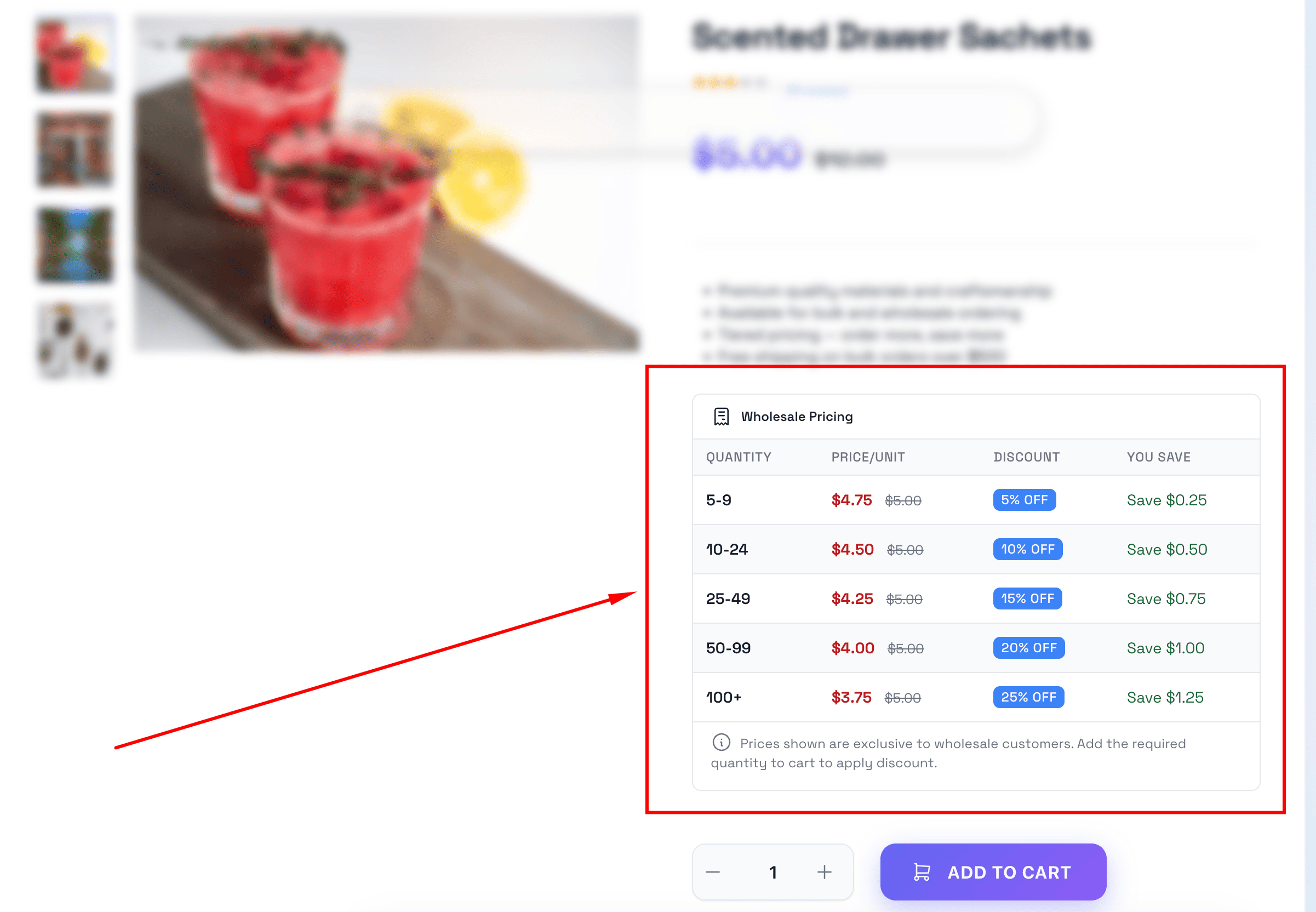
Wholesale customers see a clear pricing table right on the product page showing all available quantity tiers and their discounted prices. The table is automatically injected into any Botble theme — no template modifications needed.
Choose from four visual styles (Modern, Minimal, Classic, Elegant) and customize colors to match your brand.
Product Visibility Control
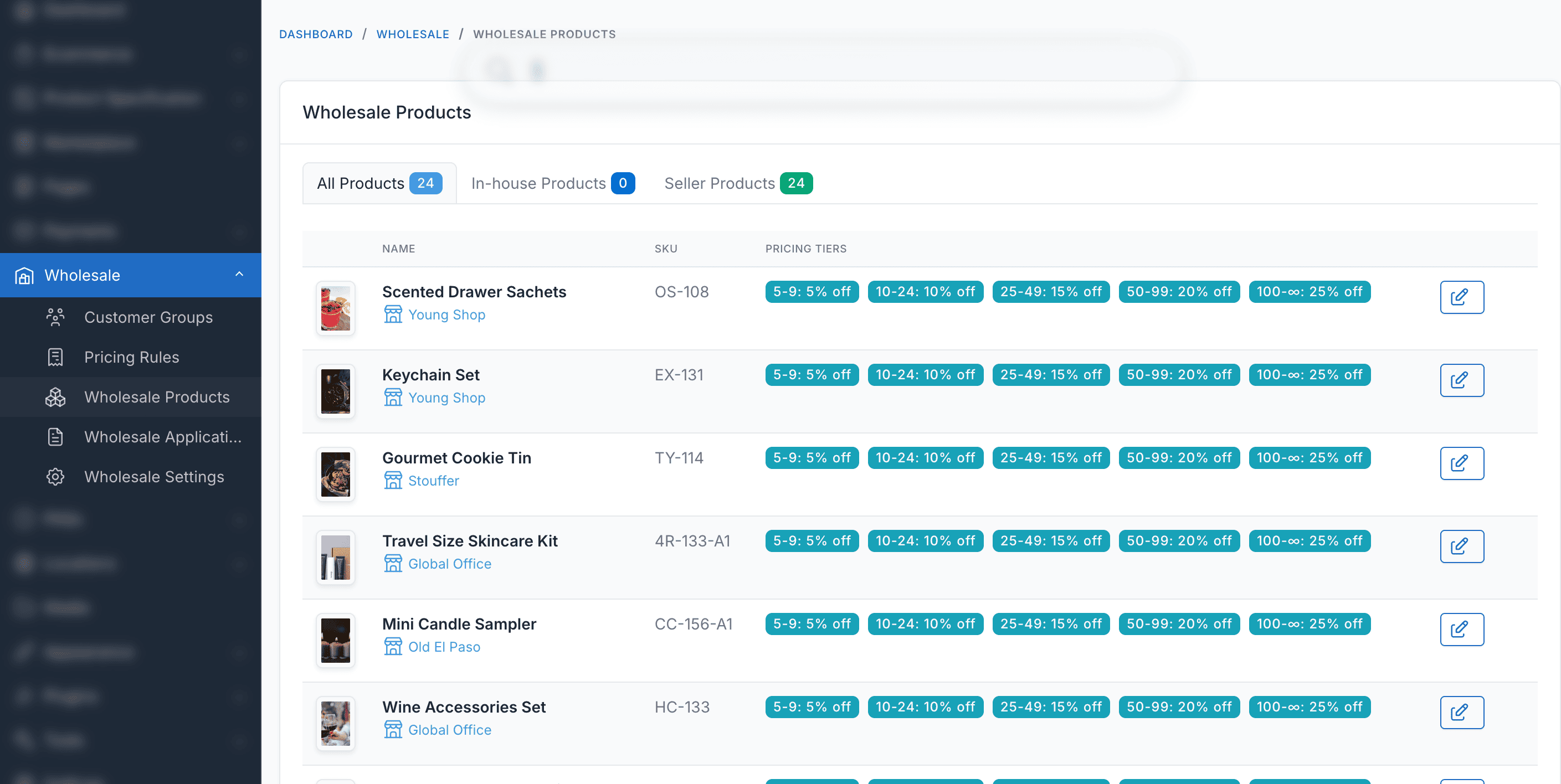
Not every product should be visible to every customer. With Wholesale, you can set products as:
- Public: Visible to all customers
- Wholesale Only: Only visible to wholesale customers
- Specific Groups: Only visible to selected customer groups
This lets you create exclusive wholesale catalogs while keeping your retail storefront clean.
Wholesale Registration Workflow
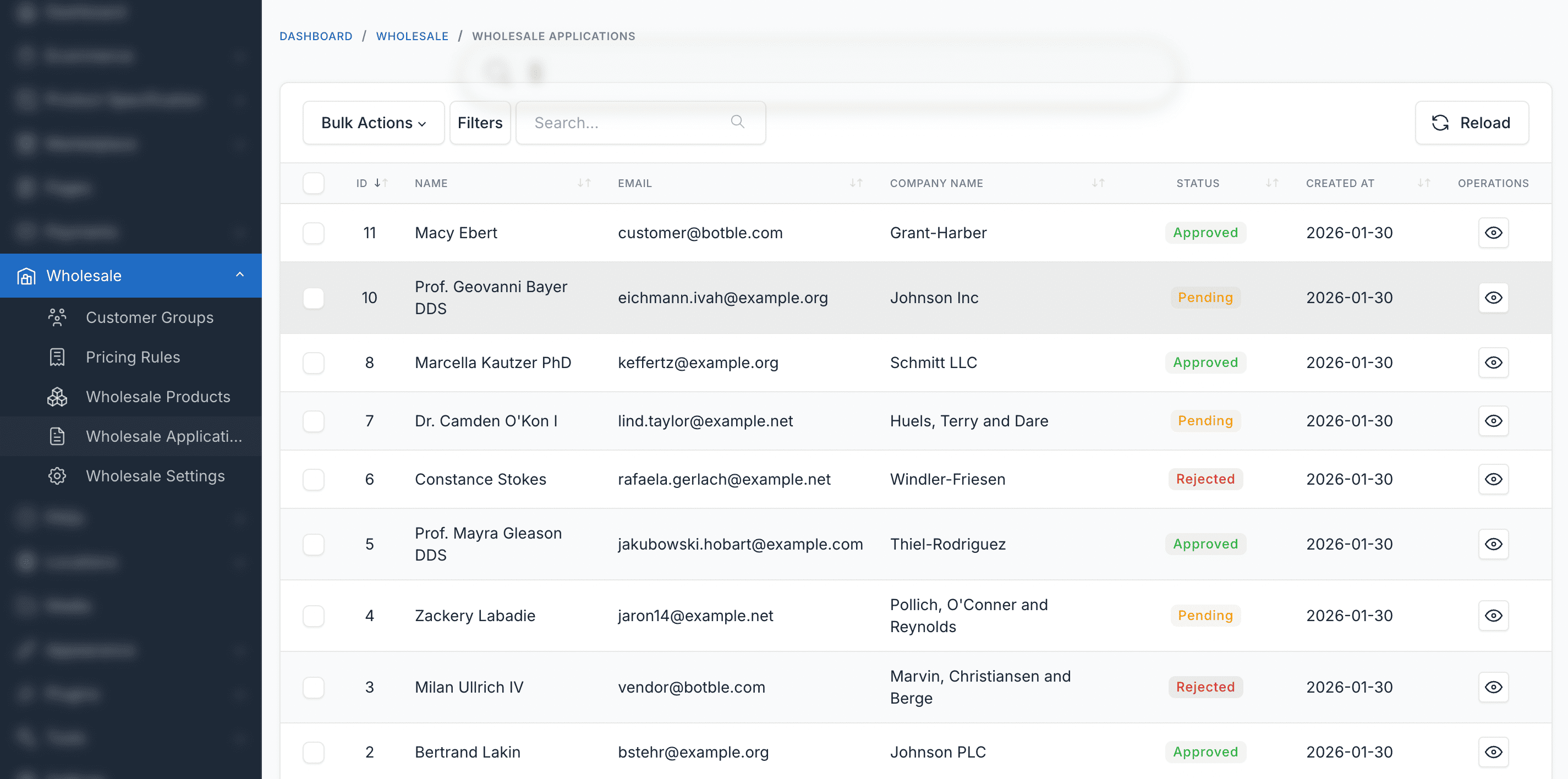
Built-in registration and approval system. Wholesale customers submit an application with their company name, tax ID, and expected order volume. Admins review applications in the dashboard and approve or reject them with a single click.
Approved customers are automatically assigned to the appropriate wholesale group and immediately see their wholesale pricing.
Minimum Order Quantities (MOQ)
Enforce minimum order quantities per product to ensure profitable wholesale orders. You can also set quantity increments — for example, require orders in multiples of 12. MOQ is validated at checkout, so customers are always informed before placing their order.
All wholesale settings for a product — MOQ, visibility, and pricing rules — are managed from a dedicated wholesale box right in the product edit form.
Smart Price Calculation
When a customer belongs to multiple groups or multiple pricing rules apply, the system automatically calculates and applies the best available price. No manual intervention needed.
Customer Dashboard
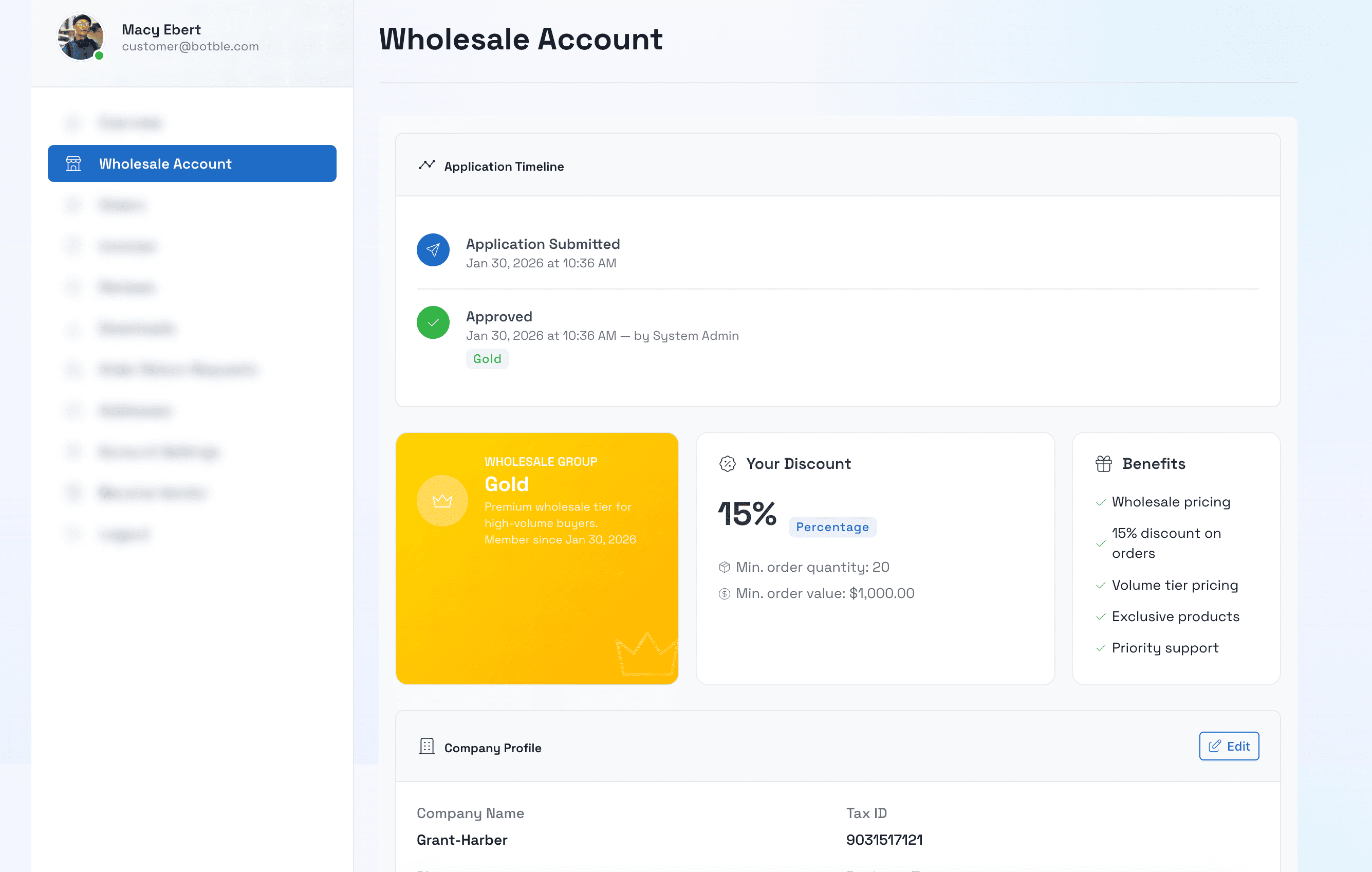
Wholesale customers get a dedicated section in their account dashboard to view their group status, company information, and wholesale account details. They can update their business info and track their wholesale status at any time.
Cart & Checkout Integration
Wholesale prices are automatically applied in the cart and at checkout with correct totals. MOQ requirements are validated before allowing the order to proceed. Everything just works.
How It Works
The setup is simple:
-
Customer Registers: Wholesale buyers submit a registration application through a dedicated form on your storefront
-
Admin Approves: Review applications in the admin panel and assign approved customers to the appropriate wholesale group
-
Wholesale Pricing Applies: Approved customers automatically see tiered wholesale prices, MOQ requirements, and group-exclusive products
-
Bulk Order & Checkout: Customers order in bulk with validated quantities and enjoy discounted pricing at checkout
Wholesale Settings
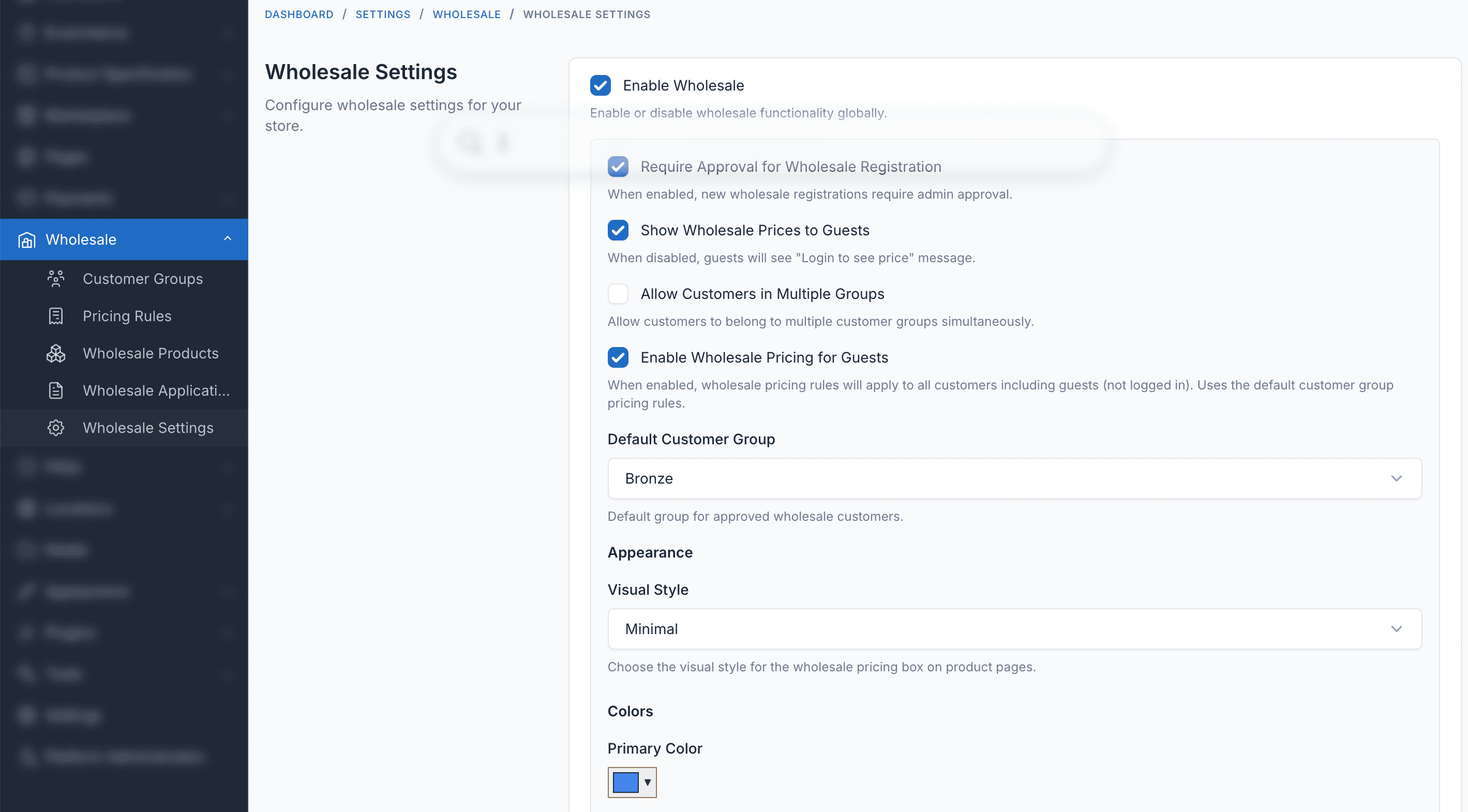
Configure every aspect of the wholesale experience from a single settings page:
- Enable/disable wholesale functionality
- Require approval for new wholesale accounts
- Show or hide wholesale pricing for guests
- Allow customers in multiple groups
- Set discount resolution strategy (best price wins, highest priority group, etc.)
- Customize pricing table appearance and colors
Multi-language Support
Wholesale is available in 30+ languages including English, French, German, Spanish, Vietnamese, Japanese, Korean, Chinese, Arabic, and more. Fully translation-ready and can be easily translated to any language from the admin area.
Technical Specifications
| Specification | Details |
|---|---|
| Version | 1.0.0 |
| Minimum Core Version | Botble CMS 7.6.0+ |
| PHP Version | 8.2+ |
| Required Plugin | Ecommerce |
| Database | MySQL 5.7+ or MariaDB 10.3+ |
Installation Guide
Requirements
- Botble CMS version 7.6.0 or higher
- PHP version 8.2 or higher
- Active E-commerce plugin (required)
- MySQL 5.7+ or MariaDB 10.3+
Installation Steps
-
Download the plugin from CodeCanyon downloads page
-
Extract the downloaded zip file to your computer
-
Upload the extracted folder to
platform/plugins/ecommerce-wholesaledirectory on your server -
Go to Admin > Plugins in your Botble CMS admin panel
-
Activate the Wholesale plugin by clicking the "Activate" button
-
Navigate to Ecommerce > Wholesale to start creating customer groups and pricing rules
After installation, configure your wholesale settings in Ecommerce > Wholesale > Settings to match your business requirements.
Compatibility
Wholesale works with all Botble e-commerce themes available on CodeCanyon. It also supports marketplace multi-vendor setups, so vendors can manage their own wholesale pricing from the vendor dashboard.
What's Included
- Complete plugin source code
- 30+ language translations
- Admin management interface
- Frontend pricing table components
- Wholesale registration workflow
- Comprehensive documentation
- 6 months free support
- Lifetime free updates
Demo & Support
- Live Demo: https://wholesale.botble.com
- Admin Demo: https://wholesale.botble.com/admin (admin / 12345678)
- Documentation: https://docs.botble.com/wholesale
- Support Center: https://botble.ticksy.com
Get Started Today
Transform your e-commerce store into a B2B wholesale platform. Easy setup, powerful features, and all future updates included free.
Note: This plugin requires Botble Ecommerce as the base platform. Make sure you have Botble CMS with the Ecommerce plugin installed before setting up Wholesale.
Leave a comment
Your email address will not be published. Required fields are marked *
License Manager - Self-Hosted License & Update Manager for Your Products
Introducing License Manager, a self-hosted Laravel-based solution for managing software licenses, activations, and updat...
Introducing Product Gifts: Boost Sales with Free Gifts for Botble Ecommerce
Increase average order value and customer satisfaction by automatically offering free gift products when customers meet...